Disconnects and disappearances on my M4 Max Studio (Sequoia) plague my 80Gbps (Thunderbolt 5) external enclosures under heavy load — when populated with E26-based NVMe SSDs. Other SSDs have randomly disappeared over the years as well.
I recently spent quite a bit of time trouble-shooting what I thought was a recalcitrant 80Gbps 4-SSD NVMe RAID enclosure. However, it soon became apparent that I was actually chasing down an incompatibility between certain SSDs and Apple’s 80Gbps implementation. Said SSDs consistently disconnected and disappeared at 80Gbps when under a heavy load such as a benchmark. Not a good thing.
I have never seen a hint of such an issue with any NVMe SSD on Intel/Windows/Linux testbeds, either while populating enclosures, or snugly sitting in an internal M.2 slot. I have, however, experienced the occasional disconnect from many different types of drives on both my M4 Max Studio and M1 Max Studio. Just not on a consistent basis.
As it turns out, the currently misfiring SSDs all had one thing in common — a Phison E26 controller. I’d love to say I was the one that spotted this, but it was actually Chris Anderson from OWC. Thanks Chris!
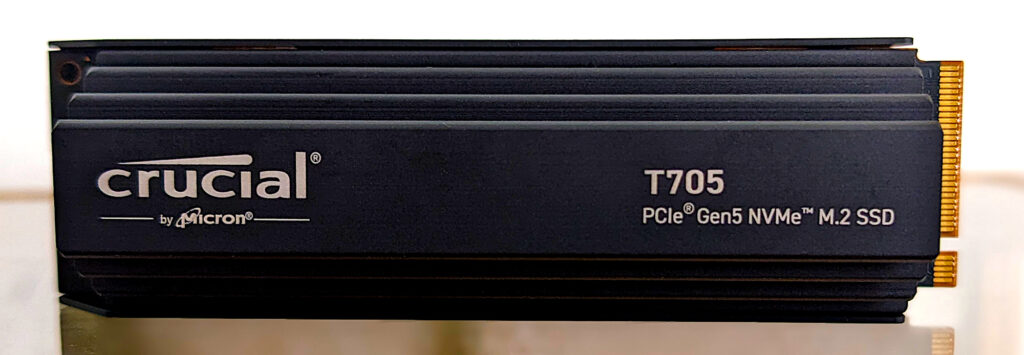
The Crucial T705 shown below is one of the Phison E26 PCIe 5.0 SSDs that are problematic on a Mac at 80Gbps.
An explanation wasn’t available as of this writing. However, I wanted to get this out there to save some users from a frustrating experience, but I’m hesitant to categorically assign blame.
That was thinking power originally as the E26 gulps quite a bit of power (approximately 3 watts idle, up to 11.55 watts under load) at full 80Gbps bore. 11.55 watts is the top limit of the PCI-SIG M.2 spec.
However, the RAID enclosure has its own power supply, so it’s hard to imagine the SSDs not having enough. I also doubt it’s thermal — I monitored temperatures using Smartmonctl and none of the SSDs got anywhere near a throttling level, let alone shutdown.
It might be a bad driver, insufficient caching, timing mismatch or something else. Phison is investigating and I expect to hear from Apple as soon as they read this. I’ll add vendor feedback as it arrives.
As to what’s caused the other disconnects over the last few years… I’ve always suspected insufficient or irregular power delivery, as they don’t afflict most machines I use. But, that’s simply a guess. It might be the bridge chips, etc. I suspect that vendors spend most of their time testing on x86 machines, not Apple Silicon
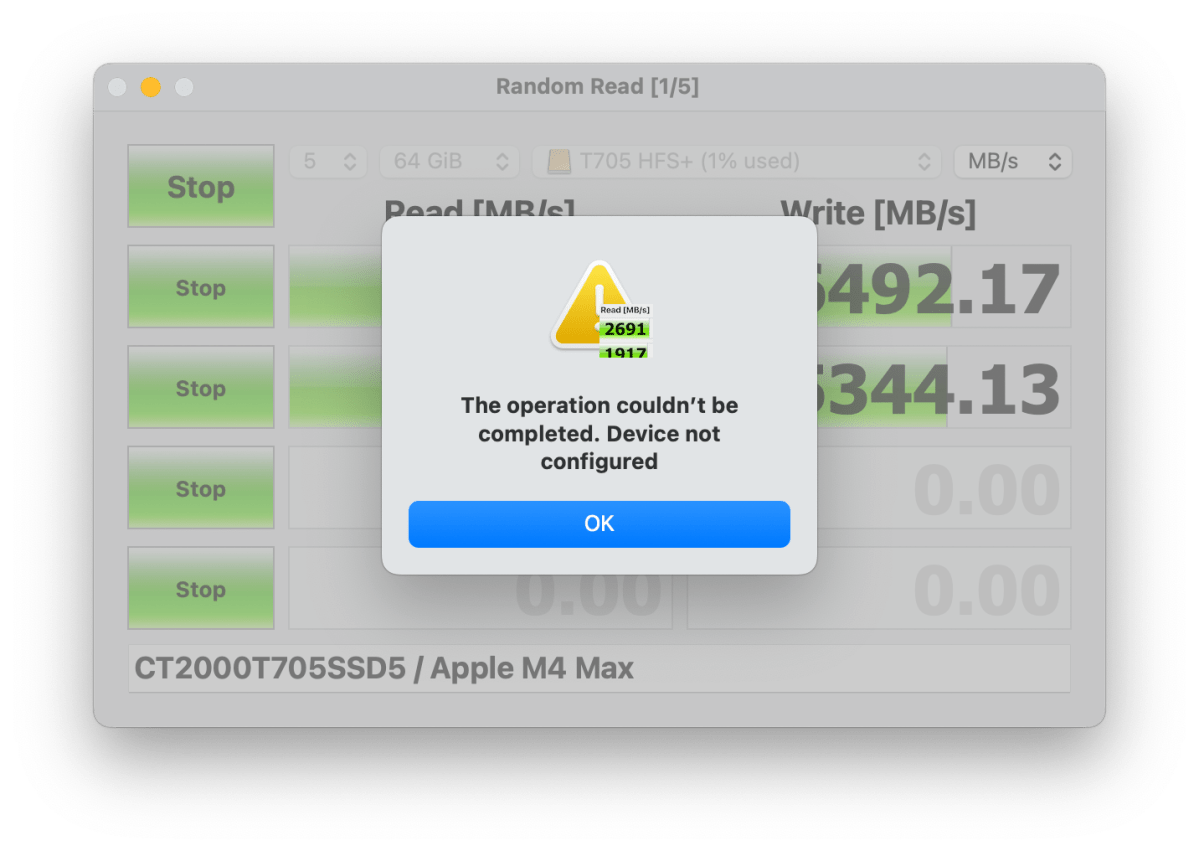
As you can see below, you’ll get a message scolding you as a user when an E26-based NVMe SSD and your 80Gbps Apple Silicon Mac’s 80Gbps bus decide they want a divorce.

AmorphousDiskMark, shown below, would never complete with an E26-based SSD connected via Thunderbolt at 80Gbps on my M4 Max Studio.
Note that the E26 has been supplanted by newer PCIe 5.0 controllers and I haven’t had any issues with any other recent PCIe 4/5 SSD controller in an 80Gbps enclosure. The industry consistently lowers SSD power requirements every generation. However, I have tested only a small percentage of those I have in 80Gbps enclosures on Apple Silicon.
Is the issue new? Is it consistent?
New? Not necessarily. Is it consistent and replicable — yes, with E26 NVMe SSDs at 80Gbps.
The 80Gbps issue came to the fore during the RAID testing. However, as I’ve already mentioned, I have noticed random disconnects with external storage on Apple Silicon Macs before, regardless of bus speed. Some involved thumb drives in the 10Gbps ports.
Previously, the relatively rare offender would reappear almost immediately, so I never investigated thoroughly or documented the occurrences. I did replace the SSD or thumb drive, but my bad. The experiences were difficult to replicate until 80Gbps Thunderbolt 5 came along. Now the E26 SSDs disappear without fail under load, so…
To completely absolve the 80Gbps RAID enclosure, I took the offending E26 SSDs and loaded them one at a time into a different single-drive, bus-powered, 80Gbps enclosure. Sure enough, all three (Crucial T705, Corsair MP700 Pro (update firmware), and Adata Legend 970) would disconnect (se the image above) and vanish every time I ran AmorphousDiskMark or during long transfers.
In fact, the Legend 970 and the MP700 Pro (a firmware update cured this) wouldn’t initialize on the 80Gbps connection. The initialization finally succeeded when I placed it in a 10Gbps TerraMaster D1 SSD enclosure. I was also able to initialize it again later on a 40Gbps bus on my older M1 Max Studio.
Things were fine with the E26 SSDs at 40Gbps as you can see below.
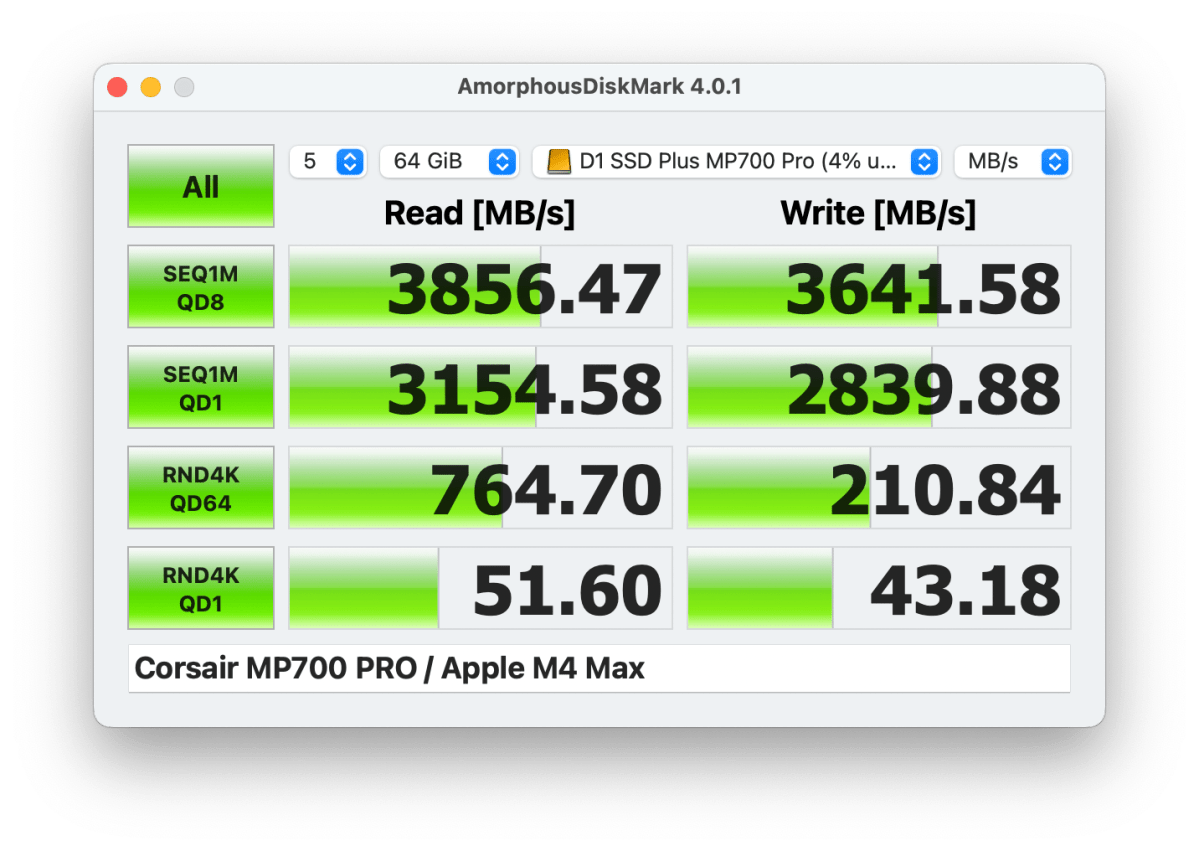
The E26 SSDs that went AWOL at 80Gbps would generally reappear after I detached then reattached the enclosure, though I had to cycle the power on the RAID box a couple of times to accomplish the same thing. Note that I still run Sequoia on the M4 Max Studio that saw most of the testing. Tahoe (which I hate) may fix the issue. I doubt it.
I tested with the SSDs formatted to APFS, HFS+, and exFAT just to make sure the problem cut across all file systems. It did. I then checked the three E26 SSDs in both a 40Gbps TerraMaster D1 SSD Plus, and a 10Gbps TerraMaster D1 SSD. All three successfully completed AmorphousDiskMark in both enclosures on the same M4 Max Studio.
All three SSDs also performed fine on an older Intel i7 Macbook Pro as well, though at only 5Gbps. I’m not 100% certain all Intel-based Macs will be okay, but I find it likely as they top out at 40Gbps Thunderbolt 4 and I never experienced these disconnects on my 2015 Core i7 iMac. My M4 MacBook Air and M1 Max Studio also top out at 40Gbps and seemed largely immune to the disconnect.
To reiterate, I had no disconnect problems whatsoever with any SSD or enclosure I’ve mentioned on my Intel test beds. This seems to be an Apple Silicon Mac-only problem.
Veritas and caveat emptor
To reiterate, I’m simply reporting a consistent phenomenon on one M4 Max Studio and scattered issues with SSD disconnects on my M1 Max Studio. Again, I haven’t determined if the issue is universal, or where the actual fault lies: firmware or software, power consumption or provision, driver fault, timer or signaling, etc. But for now I’d avoid older E26-based NVMe SSDs for 80Gbps enclosures to be used on Thunderbolt 5 Macs.
Additionally, while I had no issues at 10Gbps or 40Gbps with the E26 SSDs this go around, there are the random disconnects I’ve noted over the last few years. I can’t link those to the E26 with any sort of confidence, but neither can I discount the E26 (or other high power requirement SSDs) as a bad match in general for Apple Silicon Macs. Proceed at your own risk.
If anyone out there has also experienced the disconnect/disappear issue, please let me know. And again, check back here periodically for vendor explanations of the issue and any remedies that might become available.